
XIAO nRF54 Boards
The Seeed Studio XIAO nRF54L15 / Sense [1] and XIAO nRF54LM20A / Sense [2] boards are each based on the Nordic Semiconductor nRF54 ARM Cortex-M33 microcontroller running at 128 MHz. They have an ultra-low-power design for long battery life, and built-in Li-ion battery management. The wireless capabilities include: Bluetooth LE 6.0 (include Channel Sounding), NFC, Thread, Zigbee, Matter, Amazon Sidewalk, and Proprietary 2.4 GHz protocols.
The XIAO nRF54LM20A is particularly attractive for uLisp because it has twice as much RAM, 512 Kbytes, plus 8 Mbytes of external flash which uLisp uses to save the workspace.
The Sense versions also include the following additional on-board sensors: a Six DOF IMU (LSM6DS3TR-C), and a Microphone (MSM261DGT006).
Thanks to GitHub user Lolren for creating the excellent nRF54L15 Boards core for these boards, and for resolving a couple of small issues I encountered.
Boards
Installing uLisp from the Arduino IDE
Install the nRF54L15 Boards core
- Add the following URL to the Additional Boards Manager URLs list in the Arduino IDE Preferences dialog box:
https://raw.githubusercontent.com/lolren/nrf54-arduino-core/main/package_nrf54l15clean_index.json
- In the Arduino IDE search for Lolren's nRF54L15 Boards core in Boards Manager and install it.
I tested the board with core version 1.0.22.
- Select nRF54L15 Boards from the Board menu, and the XIAO nRF54L15 / Sense or XIAO nRF54LM20A board as appropriate from the submenu.
- Set the CPU Frequency to 128 MHz for best performance.
- Set the Port to the appropriate serial option for the board.
You can leave all the other options at their defaults.
Upload uLisp
- Download release 4.9b or later of the ARM version of uLisp from the Download uLisp page.
- Upload uLisp to the board.
As of core version 1.0.22 you no longer need to press the RESET button to run uLisp.
Common features
Using uLisp
- Select Serial Monitor from the Tools menu.
- Enter Lisp commands.
Uploading a Lisp program
The serial interface on the XIAO nRF54 boards can lock up if you attempt to transfer a large amount of data at full speed, so the following procedure is recommended when uploading a program to uLisp:
- Select it, including the comment at the top of the program, and do Copy.
- Using a terminal that provides a Slow Paste option or an equivalent, such as CoolTerm or iTerm, select Slow Paste.
The comment disables echo, which can otherwise interfere with the serial upload.
For more information see Using uLisp from a terminal.
ARM assembler
You can run ARM machine code using the defcode function built in to uLisp. For a demonstration of this evaluate:
(defcode mul13 (x) #x210d #x4348 #x4770)
This creates a machine-code routine called mul13, with one parameter, consisting of three instructions, which multiplies its single integer argument by 13. For example:
> (mul13 10)
130
There is an ARM assembler that you can use to generate machine code from assembler programs; this is written in Lisp to make it easy to extend it or add new instructions. For more information see ARM assembler overview.
XIAO nRF54L15
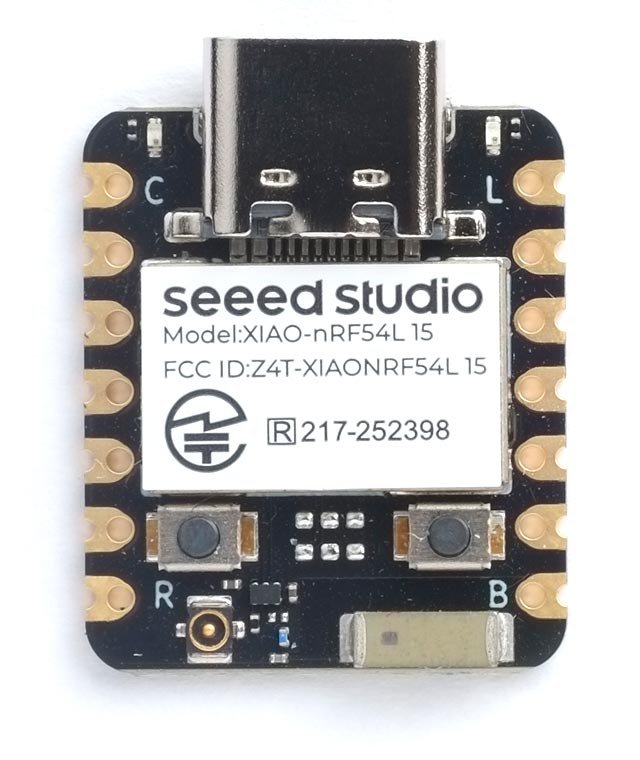
The XIAO nRF54L15 has 1.5 Mbyte of flash program memory and 256 Kbytes of RAM:
Pin connections
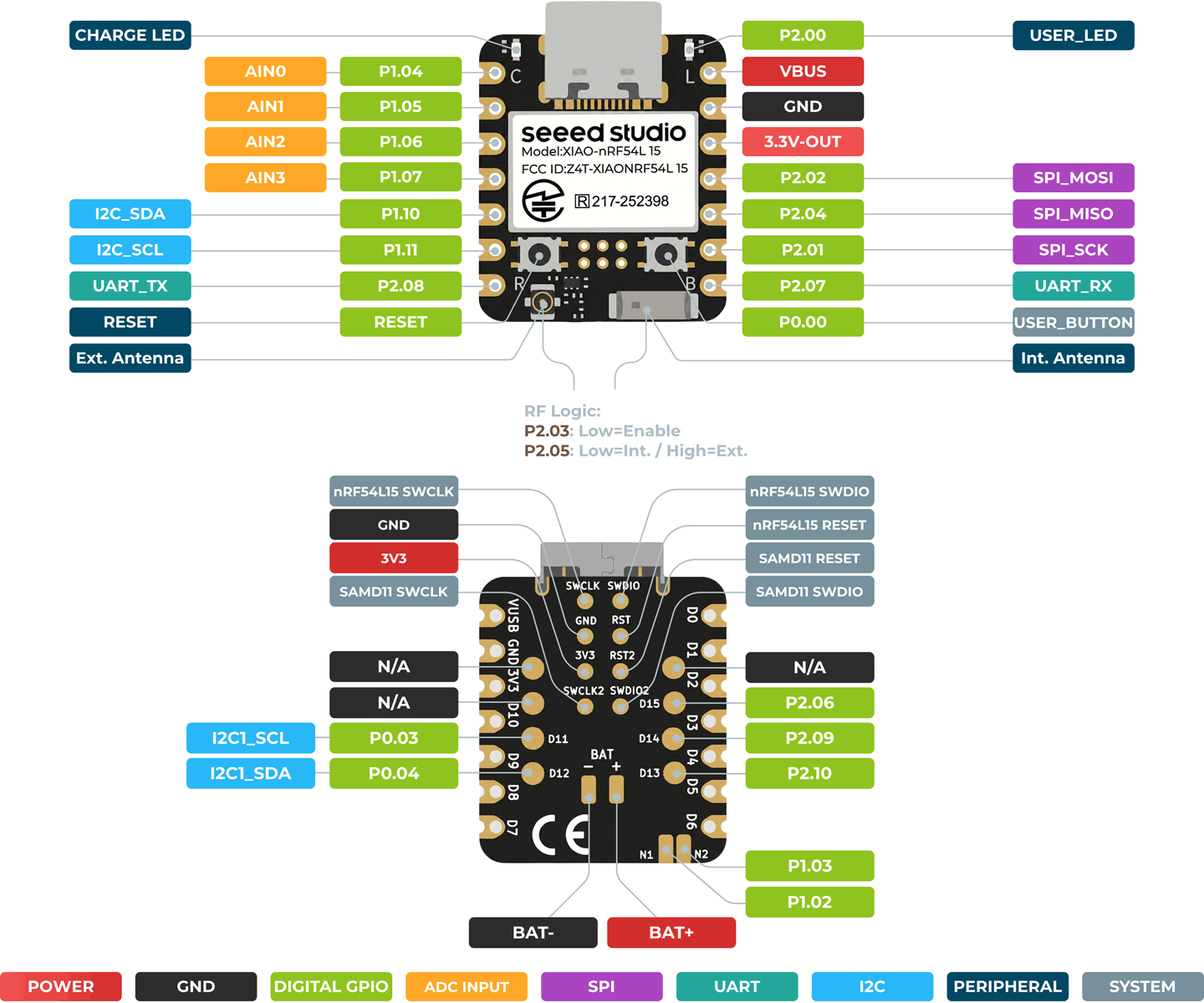
For more information see Getting Started with Seeed Studio XIAO nRF54L15 (Sense).
Saving the workspace
The XIAO nRF54L15 boards use the EEPROM emulation to allow you to save up to 128 objects of workspace using save-image.
Digital inputs and outputs
The XIAO nRF54L15 boards provide 16 digital inputs/outputs, on pin numbers 0 to 15. Pins 0 to 10 are available on the edge connectors and pins 11 to 15 are available on pads; see legends on the back of the board.
LED
The XIAO nRF54L15 boards have a green LED on pin 16; it is on when the pin is low. You can access the LED with the keyword :led-builtin. For example, you can flash it with the following program:
(defun blink (&optional x)
  (pinmode :led-builtin t)
  (digitalwrite :led-builtin x)
  (delay 1000)
  (blink (not x)))
Run it by typing:
(blink)
Exit from the program by entering ~.
Button
The user button is available on pin 17.
Analogue inputs
There are five analogue inputs on pins 0 to 3 and 5.
Analogue outputs
PWM analogue outputs are available on pins 0 to 9.
Serial
The XIAO nRF54L15 boards have one accessible serial port: Serial1 on pin numbers 6 (TX) and 7 (RX).
SPI
The XIAO nRF54L15 boards have one accessible SPI port on pin numbers 9 (MISO), 10 (MOSI), 8 (SCK), and 2 (SS).
I2C
The XIAO nRF54L15 boards have two I2C ports: port 0 on pin numbers 4 (SDA) and 5 (SCL), and port 1 on pin numbers 12 (SDA) and 11 (SCL), accessible on pads on the back of the board.
PWM
There is a GRTC PWM interface on pin 11.
Battery management
The XIAO nRF54L15 boards can be powered by a 3.7V – 5V battery connected to the BAT- and BAT+ terminals on the back of the board. The battery voltage VBAT/2 can be measured by analogue input A7 on pin 27. To enable this digital pin 23 should be taken high.
XIAO nRF54LM20A
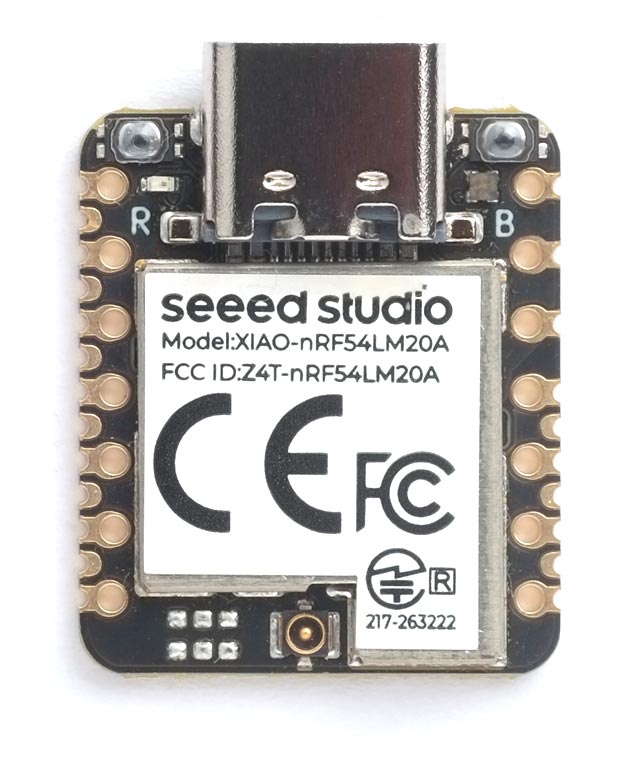
The XIAO nRF54LM20A has 2 Mbytes of flash program memory and 512 Kbytes of RAM, plus 8 Mbytes of external flash which uLisp uses to save the workspace:
Pin connections
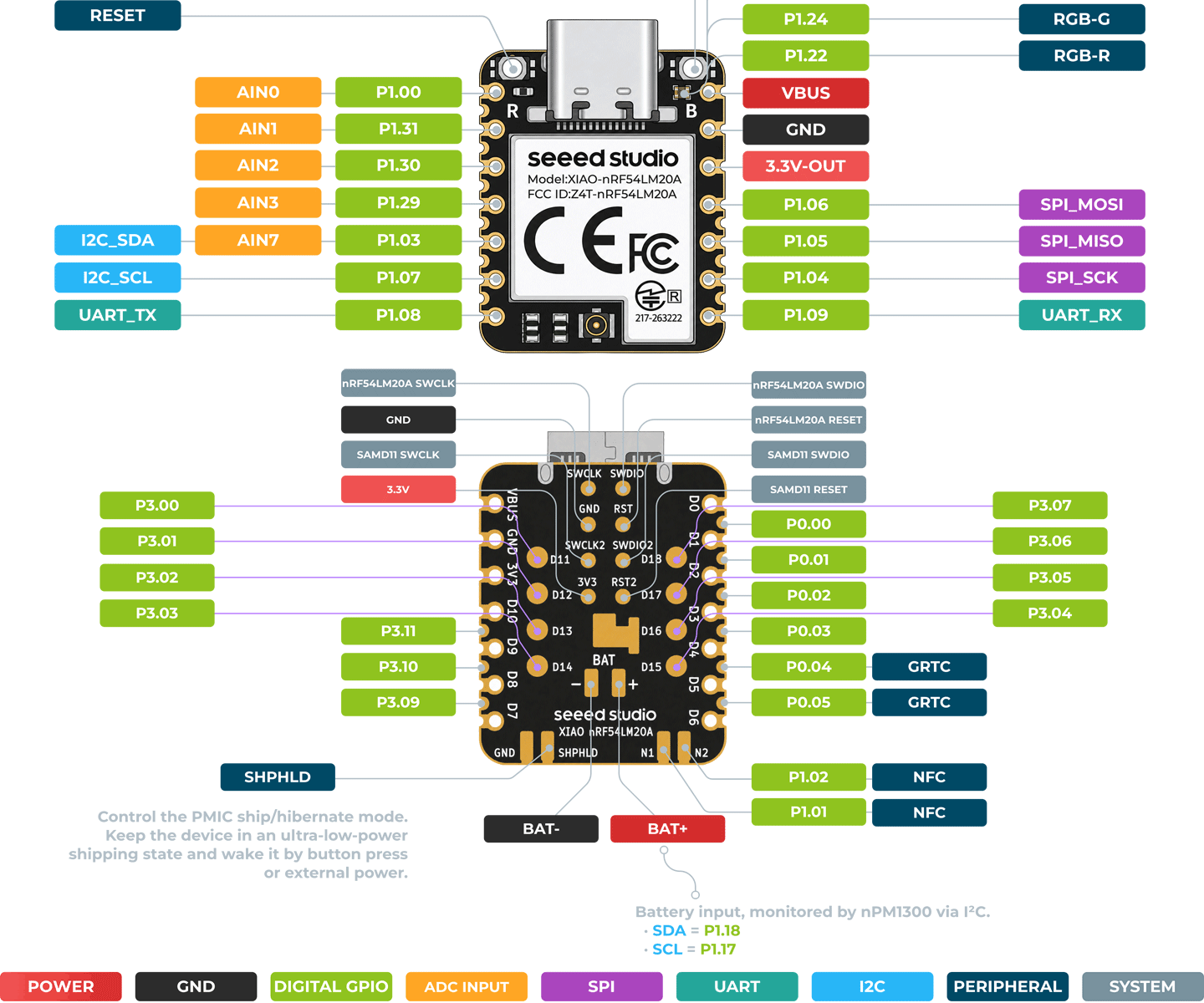
For more information see Getting Started with Seeed Studio XIAO nRF54LM20A (Sense).
Saving the workspace
The XIAO nRF54LM20A boards use the on-board DataFlash to allow you to save the entire workspace using save-image.
Digital inputs and outputs
The XIAO nRF54LM20A boards provide 28 digital inputs/outputs, on pin numbers 0 to 27. Pins 0 to 10 are available on the edge connectors and pins 11 to 18 are available on pads; see legends on the back of the board.
LED
The XIAO nRF54LM20A boards have an RGB LED on pins 28 (red), 29 (blue), and 30 (green). You can access the red LED with the keyword :led-builtin. For example, you can flash it with the following program:
(defun blink (&optional x)
  (pinmode :led-builtin t)
  (digitalwrite :led-builtin x)
  (delay 1000)
  (blink (not x)))
Run it by typing:
(blink)
Exit from the program by entering ~.
Analogue inputs
There are five analogue inputs on pins 0 to 4.
Analogue outputs
PWM analogue outputs are available on pins 0 to 10.
Serial
The XIAO nRF54LM20A boards have one accessible serial port: Serial1 on pin numbers 6 (TX) and 7 (RX).
SPI
The XIAO nRF54LM20A boards have one accessible SPI port on pin numbers 9 (MISO), 10 (MOSI), 8 (SCK), and 2 (SS).
I2C
The XIAO nRF54LM20A boards have two I2C ports: port 0 on pin numbers 4 (SDA) and 5 (SCL), and port 1 on pin numbers 36 (SDA) and 37 (SCL).
PWM
There is a GRTC PWM interface on pin 22.
Battery management
The XIAO nRF54LM20A boards can be powered by a 3.7V – 5V battery connected to the BAT- and BAT+ terminals on the back of the board.
- ^ XIAO nRF54L15 on Seeed Studio.
- ^ XIAO nRF54LM20A on Seeed Studio.